

The cheapest recovery is rarely the fastest one
Three ways the Schedule Recovery Solver changes what a bad day costs
Every controller knows the moment. A hub closes, and within minutes the alerts are stacking up faster than you can work them. The question is rarely how to fully recover the schedule. It’s how to minimize the impact of the disruption.
Most recovery decisions are made under time pressure, with that cost only half-visible. The Schedule Recovery Solver exists to make the cost visible before you commit, and to show you that there is more than one way through.
1. Every action has a cost
Each action carries a penalty, whether it’s delaying a flight, swapping an aircraft, or canceling one. That penalty is set by parameters you configure and by the variables of the action itself: how long the delay is, how many passengers are affected, and which aircraft type is involved. A delay penalty scales with the delay duration and the flight’s value, which you can set manually per flight or let the passenger reservation system compute automatically. Swapping the aircraft assigned to a flight carries its own penalty parameter.
But a delay rarely costs only that, and this is where a cost model either reflects your operation or doesn’t. Push a flight past the crew drop-dead limit and a separate penalty applies. Each carries its own penalty, and you define what it’s worth. You can add rules and penalties covering crew aspects and passenger protection. All of it sits behind a parameter interface your local system administrator can change at short notice.
2. It gives you the trade-off instead of making it for you
Here’s where the solver is deliberately modest about its own judgment.
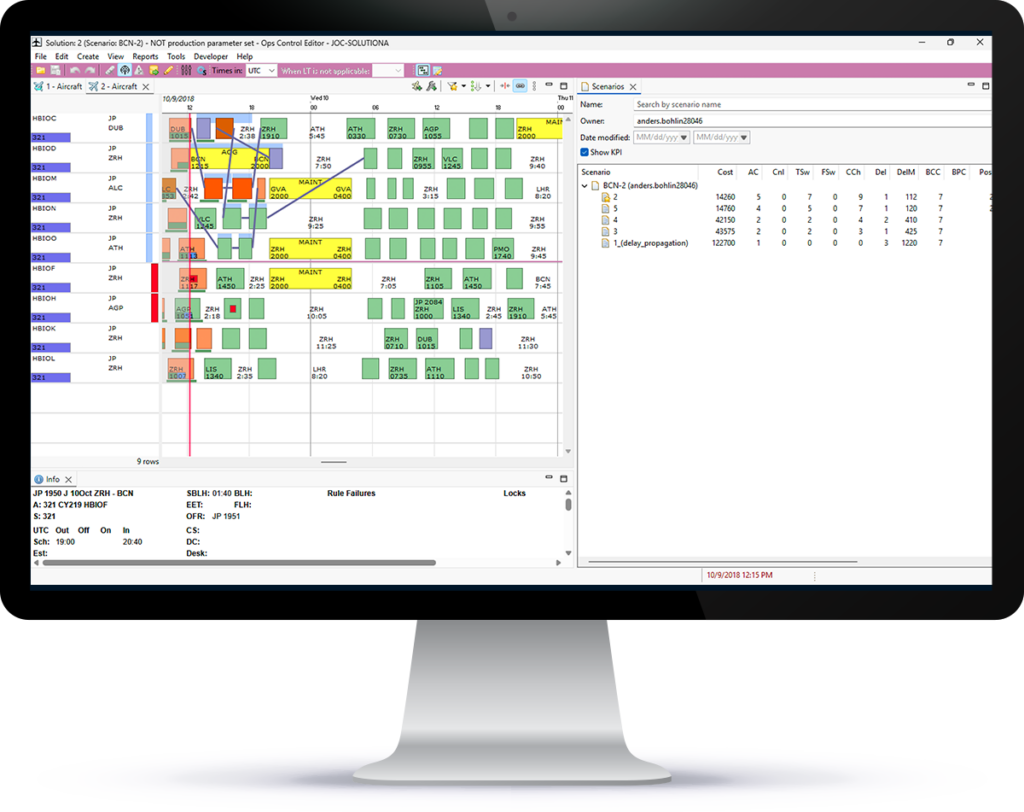
There are usually several ways to recover a disruption, and it’s usually not obvious which one you should take. The solver doesn’t choose. It searches for a number of solutions, assigns each a preliminary score, and returns them all as structurally different options. The solver returns options built around different priorities: a passenger-friendly option (fewest missed connections), a crew-friendly (fewest crew breaks), and a cost-friendly option (lowest cost). You then choose whichever best fits the situation, with full visibility into the trade-offs.
What makes that decision tractable is that you’ve already told the solver what you care about. You can investigate the trade-off between a quick recovery and a low operational cost, or between minimum changes and a stable operation. You can set priorities: limit the number of flight swaps, minimize re-timings. Change what you’re optimizing for and you change the options that come back.
There’s a second mode worth knowing about, and it’s the one that builds trust. Alongside generating options, the solver can evaluate them. Feed it options you built, and it won’t search for anything new; it will simply compute the objective function for what you gave it. Now you can put your instinct next to the solver’s output and see how they score against each other. That’s the honest way to tune your parameters, and the honest way to find out whether the solver’s cost model matches your operation’s.
3. The constraints you can’t negotiate stay non-negotiable
All business rules and penalties are controlled through a parameter interface. This guarantees that alerts and suggested recovery options always respect your business rules and quality policies.
The scope of that is broad: desirable flight patterns, restrictions caused by operational deficiencies of individual aircraft, and the stability of maintenance activities. And because the same interface carries all of it, the rule set keeps up with new fleets, new timetables, and new policy rather than hardening into something you work around.
Take airport thinning as an example. Heavy snowfall or convective weather moves into the terminal area, and the airport responds by cutting arrival capacity, departure capacity, or both. It then asks you to hold a rate, for example, ten movements an hour or a percentage reduction. In Ops Control, you add the airport event with a validity time and the required spacing between arrivals and departures, then start the solver. Its objective is to respect that spacing. Its authority is to cancel, delay, or swap. Every other objective you’ve already set still applies, so the result can combine all three: canceling, delaying, and swapping as needed.
The disruption you’re recovering has already moved
One last thing matters here: the live plan doesn’t stand still while you’re working a scenario, and that’s what separates a good option from a usable one. The Ops Control Editor continuously refreshes the scenario with live plan data, so you can spot conflicts between a solver solution and current reality before you act on anything.
Recovery will always cost something. The useful goal isn’t a free recovery. It’s knowing what you’re paying.
Three ways the Schedule Recovery Solver changes what a bad day costs
Every controller knows the moment. A hub closes, and within minutes the alerts are stacking up faster than you can work them. The question is rarely how to fully recover the schedule. It’s how to minimize the impact of the disruption.
Most recovery decisions are made under time pressure, with that cost only half-visible. The Schedule Recovery Solver exists to make the cost visible before you commit, and to show you that there is more than one way through.
1. Every action has a cost
Each action carries a penalty, whether it’s delaying a flight, swapping an aircraft, or canceling one. That penalty is set by parameters you configure and by the variables of the action itself: how long the delay is, how many passengers are affected, and which aircraft type is involved. A delay penalty scales with the delay duration and the flight’s value, which you can set manually per flight or let the passenger reservation system compute automatically. Swapping the aircraft assigned to a flight carries its own penalty parameter.
But a delay rarely costs only that, and this is where a cost model either reflects your operation or doesn’t. Push a flight past the crew drop-dead limit and a separate penalty applies. Each carries its own penalty, and you define what it’s worth. You can add rules and penalties covering crew aspects and passenger protection. All of it sits behind a parameter interface your local system administrator can change at short notice.
2. It gives you the trade-off instead of making it for you
Here’s where the solver is deliberately modest about its own judgment.
There are usually several ways to recover a disruption, and it’s usually not obvious which one you should take. The solver doesn’t choose. It searches for a number of solutions, assigns each a preliminary score, and returns them all as structurally different options. The solver returns options built around different priorities: a passenger-friendly option (fewest missed connections), a crew-friendly (fewest crew breaks), and a cost-friendly option (lowest cost). You then choose whichever best fits the situation, with full visibility into the trade-offs.
What makes that decision tractable is that you’ve already told the solver what you care about. You can investigate the trade-off between a quick recovery and a low operational cost, or between minimum changes and a stable operation. You can set priorities: limit the number of flight swaps, minimize re-timings. Change what you’re optimizing for and you change the options that come back.
There’s a second mode worth knowing about, and it’s the one that builds trust. Alongside generating options, the solver can evaluate them. Feed it options you built, and it won’t search for anything new; it will simply compute the objective function for what you gave it. Now you can put your instinct next to the solver’s output and see how they score against each other. That’s the honest way to tune your parameters, and the honest way to find out whether the solver’s cost model matches your operation’s.
3. The constraints you can’t negotiate stay non-negotiable
All business rules and penalties are controlled through a parameter interface. This guarantees that alerts and suggested recovery options always respect your business rules and quality policies.
The scope of that is broad: desirable flight patterns, restrictions caused by operational deficiencies of individual aircraft, and the stability of maintenance activities. And because the same interface carries all of it, the rule set keeps up with new fleets, new timetables, and new policy rather than hardening into something you work around.
Take airport thinning as an example. Heavy snowfall or convective weather moves into the terminal area, and the airport responds by cutting arrival capacity, departure capacity, or both. It then asks you to hold a rate, for example, ten movements an hour or a percentage reduction. In Ops Control, you add the airport event with a validity time and the required spacing between arrivals and departures, then start the solver. Its objective is to respect that spacing. Its authority is to cancel, delay, or swap. Every other objective you’ve already set still applies, so the result can combine all three: canceling, delaying, and swapping as needed.
The disruption you’re recovering has already moved
One last thing matters here: the live plan doesn’t stand still while you’re working a scenario, and that’s what separates a good option from a usable one. The Ops Control Editor continuously refreshes the scenario with live plan data, so you can spot conflicts between a solver solution and current reality before you act on anything.
Recovery will always cost something. The useful goal isn’t a free recovery. It’s knowing what you’re paying.