
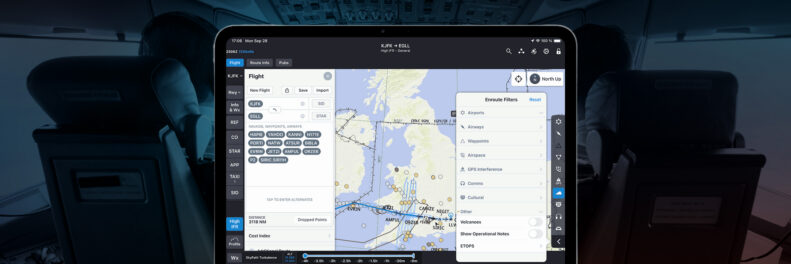
What’s New in Jeppesen FliteDeck Pro 5.3
The latest release of FliteDeck Pro, version 5.3, is here! Take a look at the new features and functionality helping commercial flight crews stay ahead of weather, terrain, and workload.
The operational environment for pilots is complex and demanding. Flight crews need digital tools that reduce workload and sharpen situational awareness so they can focus on safely executing the mission. FliteDeck Pro 5.3 delivers a major leap forward in vertical situational awareness, along with a set of targeted improvements across NOTAMs, Briefing, connectivity, and global coverage.
This release is built to help crews make better altitude and routing decisions, spend less time managing paperwork, and stay connected no matter what avionics or GPS hardware they fly with.
Make Better Altitude Decisions with the New Enroute Profile View
For operators subscribed to Enroute Intelligence, FliteDeck Pro 5.3 introduces the Enroute Profile View, a cross-section perspective of terrain and weather along the active route. Instead of piecing together altitude decisions from separate map layers, pilots can now see exactly what lies ahead vertically, and make more informed calls on routing and step climbs before they become an issue.
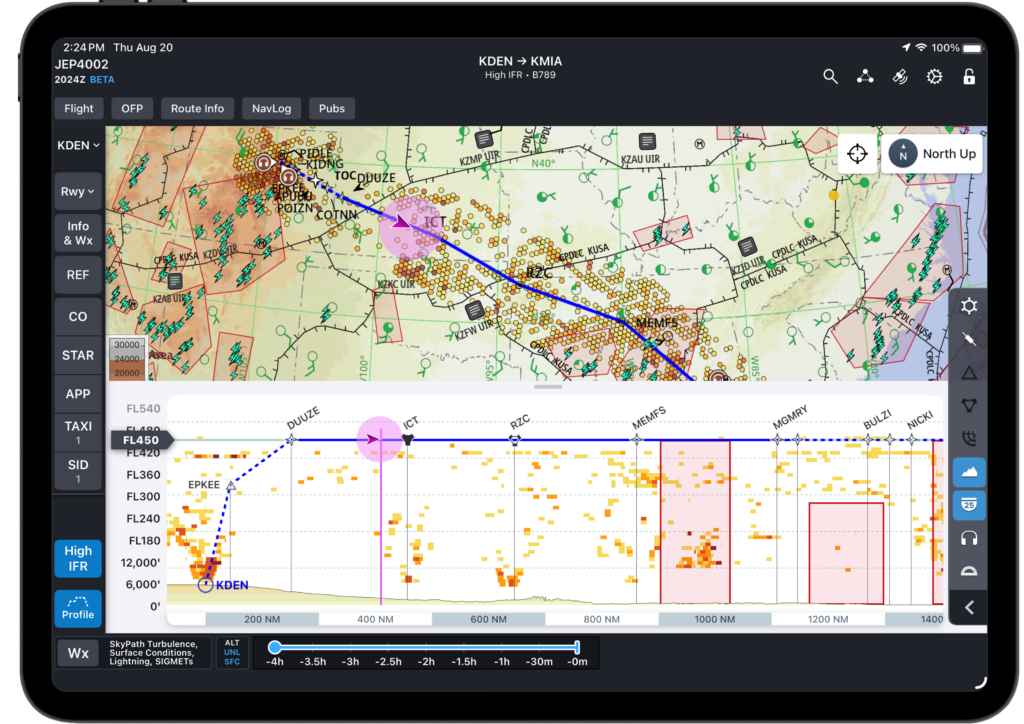
View route, weather, and terrain in cross-sections along the enroute map in FliteDeck Pro 5.3 with the new Enroute Profile View.
From the Enroute map, a single tap on the Profile button opens the Profile drawer. From there, pilots can pan, zoom, and rescale the view around the cruise altitude slider, which defaults to the cruise altitude taken from the flight plan, when available.
Key capabilities of Enroute Profile View:
- Weather in context: Turbulence, icing potential, winds and temps aloft, SIGMETs, and Volcanic Ash Advisories all display within a 20 nautical mile corridor around the route, so crews see only what’s relevant within their immediate flight path.
- Terrain awareness: A banded terrain gradient, matched to the enroute map’s contour legend, displays exactly along the route line.
- Route fix symbols and labels: Reporting points, user-defined waypoints, SIDs, STARs, and navaids all appear in the cross-section, with operators able to define an approved waypoint list for finer control over what displays.
- Ownship position: A moving symbol tracks the aircraft’s position, fading out beyond 20 nautical miles laterally and disappearing entirely past 50 nautical miles.
- Flight plan altitude data: Step climbs, descents, and SID/STAR altitudes from the loaded flight plan display automatically, giving crews a clear picture of the planned vertical profile.
The Enroute Profile View gives pilots and dispatchers a shared, at-a-glance understanding of what’s ahead, reducing the mental math required to reconcile weather, terrain, and altitude across separate displays.
Learn more about Enroute Profile view here.
Stay Oriented on the Ground with Track Up on Landing
FliteDeck Pro can now automatically switch the Airport Moving Map to a Track Up orientation the moment an aircraft lands, aligning the display with the aircraft’s direction of travel. This gives crews immediate situational awareness for an upcoming taxiway exit without any manual adjustment during a high-workload phase of flight.
Once enabled in application settings, the map maintains Track Up orientation through taxi, even when the aircraft comes to a stop, while new flights still default to North Up unless preconfigured otherwise.
Get to Relevant NOTAMs Faster
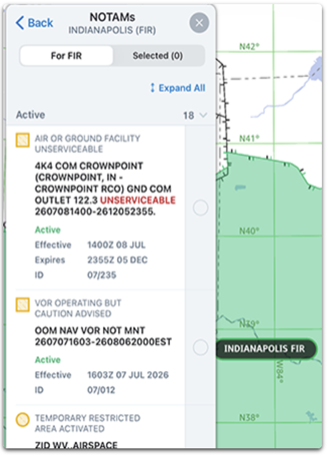
Reviewing NOTAMs is a critical but often time-consuming part of flight preparation. FliteDeck Pro 5.3 optimizes how NOTAMs are downloaded along the route, delivering the most relevant information with reduced download time and no configuration required.
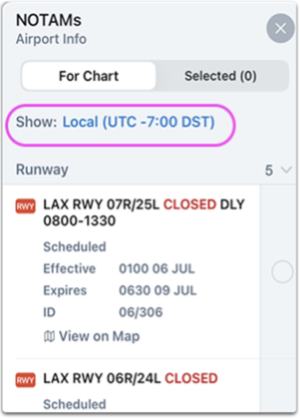
Crews can also now choose how NOTAM effective times display, selecting either Zulu or Local time directly from the NOTAMs popup. Together, these updates help pilots and dispatchers spend less time waiting and parsing, and more time briefing what matters.
Simplify Sign-In and Delay Reporting with Briefing Updates
Two Briefing Module enhancements streamline how pilots authenticate and report operational data.
- Single Sign-On: Briefing subscribers using the FliteBrief flight-planning service can now sign in through their company’s authentication service to access assigned flight plans, either automatically through device-assigned credentials or manually using company credentials.
- OFP Delay Codes: Pilots can now submit Delay Codes directly from the OFP Summary in FliteDeck Pro, rather than reporting them through a separate system. Codes are entered by category, quickly editable afterward, and clearly indicated in the Delay Code view, cutting out a redundant step from post-flight reporting.
Reduce Enroute Map Clutter
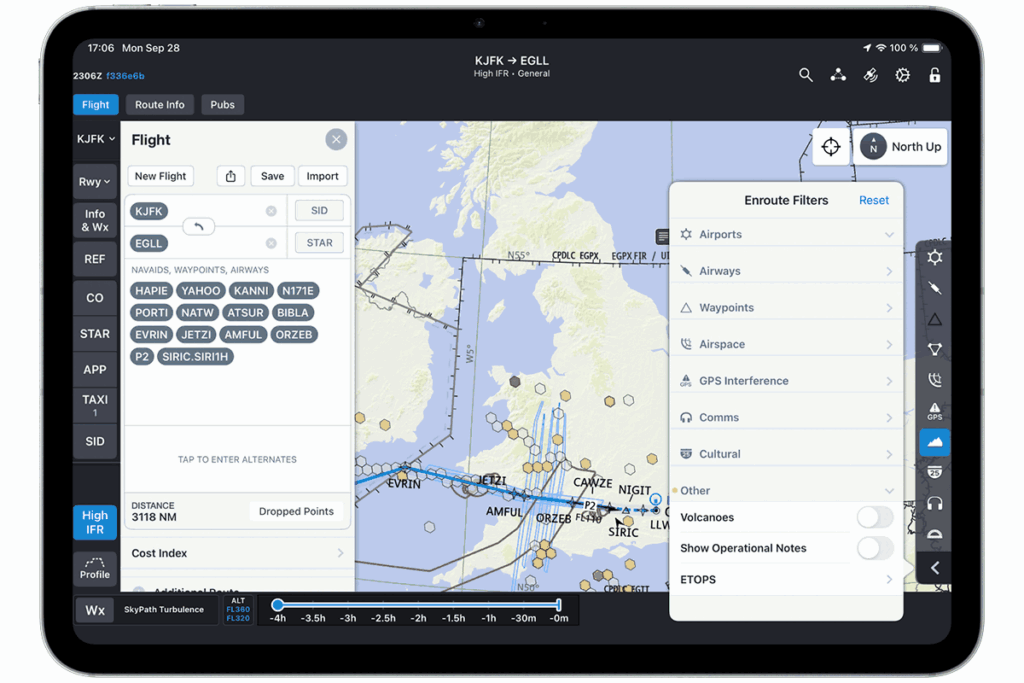
Pilots can now filter operational notes from the Enroute map entirely, decluttering the display to support situational awareness during high-workload phases of flight. A single toggle in the Enroute filters menu turns operational notes off when they’re not needed.
Broaden GPS Connectivity with New AID Provider Support
FliteDeck Pro 5.3 expands compatibility for Aircraft Interface Device (AID) connections. Operators flying the Airbus A350 can now connect FliteDeck Pro directly to A350 avionics to retrieve GPS data, either through operator pre-configuration or manual selection of Airbus Class 2 in application settings. The Bad Elf GPS device has also been added as a supported AID provider, giving operators another flexible option for retrieving reliable position data on the flight deck.
Expanded D-ATIS Coverage
FliteDeck Pro’s D-ATIS coverage continues to grow, with Canadian airports now added to the list of locations providing digital ATIS. Combined with existing coverage across the United States, Australia, Norway, and Qatar, crews operating internationally have access to D-ATIS at an expanding list of major airports worldwide.
Jeppesen ForeFlight’s Commitment to Pilot-Centric Innovation
The release of FliteDeck Pro 5.3 reinforces our commitment to giving pilots the tools they need to manage vertical situational awareness, reduce administrative workload, and stay connected across a widening range of avionics and hardware. From a new way to see terrain and weather in cross-section to faster NOTAMs and simplified sign-in, this update is designed to keep crews focused on what matters most: the safe and successful completion of their flight.
To learn more about the full capabilities coming with FliteDeck Pro 5.3, request a demo with the Jeppesen ForeFlight team.
The latest release of FliteDeck Pro, version 5.3, is here! Take a look at the new features and functionality helping commercial flight crews stay ahead of weather, terrain, and workload.
The operational environment for pilots is complex and demanding. Flight crews need digital tools that reduce workload and sharpen situational awareness so they can focus on safely executing the mission. FliteDeck Pro 5.3 delivers a major leap forward in vertical situational awareness, along with a set of targeted improvements across NOTAMs, Briefing, connectivity, and global coverage.
This release is built to help crews make better altitude and routing decisions, spend less time managing paperwork, and stay connected no matter what avionics or GPS hardware they fly with.
Make Better Altitude Decisions with the New Enroute Profile View
For operators subscribed to Enroute Intelligence, FliteDeck Pro 5.3 introduces the Enroute Profile View, a cross-section perspective of terrain and weather along the active route. Instead of piecing together altitude decisions from separate map layers, pilots can now see exactly what lies ahead vertically, and make more informed calls on routing and step climbs before they become an issue.
View route, weather, and terrain in cross-sections along the enroute map in FliteDeck Pro 5.3 with the new Enroute Profile View.
From the Enroute map, a single tap on the Profile button opens the Profile drawer. From there, pilots can pan, zoom, and rescale the view around the cruise altitude slider, which defaults to the cruise altitude taken from the flight plan, when available.
Key capabilities of Enroute Profile View:
- Weather in context: Turbulence, icing potential, winds and temps aloft, SIGMETs, and Volcanic Ash Advisories all display within a 20 nautical mile corridor around the route, so crews see only what’s relevant within their immediate flight path.
- Terrain awareness: A banded terrain gradient, matched to the enroute map’s contour legend, displays exactly along the route line.
- Route fix symbols and labels: Reporting points, user-defined waypoints, SIDs, STARs, and navaids all appear in the cross-section, with operators able to define an approved waypoint list for finer control over what displays.
- Ownship position: A moving symbol tracks the aircraft’s position, fading out beyond 20 nautical miles laterally and disappearing entirely past 50 nautical miles.
- Flight plan altitude data: Step climbs, descents, and SID/STAR altitudes from the loaded flight plan display automatically, giving crews a clear picture of the planned vertical profile.
The Enroute Profile View gives pilots and dispatchers a shared, at-a-glance understanding of what’s ahead, reducing the mental math required to reconcile weather, terrain, and altitude across separate displays.
Learn more about Enroute Profile view here.
Stay Oriented on the Ground with Track Up on Landing
FliteDeck Pro can now automatically switch the Airport Moving Map to a Track Up orientation the moment an aircraft lands, aligning the display with the aircraft’s direction of travel. This gives crews immediate situational awareness for an upcoming taxiway exit without any manual adjustment during a high-workload phase of flight.
Once enabled in application settings, the map maintains Track Up orientation through taxi, even when the aircraft comes to a stop, while new flights still default to North Up unless preconfigured otherwise.
Get to Relevant NOTAMs Faster
Reviewing NOTAMs is a critical but often time-consuming part of flight preparation. FliteDeck Pro 5.3 optimizes how NOTAMs are downloaded along the route, delivering the most relevant information with reduced download time and no configuration required.
Crews can also now choose how NOTAM effective times display, selecting either Zulu or Local time directly from the NOTAMs popup. Together, these updates help pilots and dispatchers spend less time waiting and parsing, and more time briefing what matters.
Simplify Sign-In and Delay Reporting with Briefing Updates
Two Briefing Module enhancements streamline how pilots authenticate and report operational data.
- Single Sign-On: Briefing subscribers using the FliteBrief flight-planning service can now sign in through their company’s authentication service to access assigned flight plans, either automatically through device-assigned credentials or manually using company credentials.
- OFP Delay Codes: Pilots can now submit Delay Codes directly from the OFP Summary in FliteDeck Pro, rather than reporting them through a separate system. Codes are entered by category, quickly editable afterward, and clearly indicated in the Delay Code view, cutting out a redundant step from post-flight reporting.
Reduce Enroute Map Clutter
Pilots can now filter operational notes from the Enroute map entirely, decluttering the display to support situational awareness during high-workload phases of flight. A single toggle in the Enroute filters menu turns operational notes off when they’re not needed.
Broaden GPS Connectivity with New AID Provider Support
FliteDeck Pro 5.3 expands compatibility for Aircraft Interface Device (AID) connections. Operators flying the Airbus A350 can now connect FliteDeck Pro directly to A350 avionics to retrieve GPS data, either through operator pre-configuration or manual selection of Airbus Class 2 in application settings. The Bad Elf GPS device has also been added as a supported AID provider, giving operators another flexible option for retrieving reliable position data on the flight deck.
Expanded D-ATIS Coverage
FliteDeck Pro’s D-ATIS coverage continues to grow, with Canadian airports now added to the list of locations providing digital ATIS. Combined with existing coverage across the United States, Australia, Norway, and Qatar, crews operating internationally have access to D-ATIS at an expanding list of major airports worldwide.
Jeppesen ForeFlight’s Commitment to Pilot-Centric Innovation
The release of FliteDeck Pro 5.3 reinforces our commitment to giving pilots the tools they need to manage vertical situational awareness, reduce administrative workload, and stay connected across a widening range of avionics and hardware. From a new way to see terrain and weather in cross-section to faster NOTAMs and simplified sign-in, this update is designed to keep crews focused on what matters most: the safe and successful completion of their flight.
To learn more about the full capabilities coming with FliteDeck Pro 5.3, request a demo with the Jeppesen ForeFlight team.