What is Jeppesen Enroute Intelligence: A Guide for Commercial Flight Deck Crews
Today’s commercial airline and cargo crews are navigating a more complex operational environment than ever before: GNSS spoofing incidents have increased, NOTAM volumes continue to grow, and airspace complexity is rising across every major route structure.
At the same time, the tools available to pilots and crews are better than they’ve ever been, delivering more information and data points across all phases of flight. However, more data isn’t necessarily the answer. Flight decks are already demanding, procedure-driven environments and adding more information without a clear plan for how it reaches the crew doesn’t improve situational awareness, it adds noise to an already technical and labor-intensive workflow.
What helps crews is not the volume of data available to them, but whether the right data reaches them at the right time, inside the systems and workflows they already use.
That’s the premise behind Jeppesen Enroute Intelligence, an advanced situational awareness capability within Jeppesen FliteDeck Pro. The last thing your EFB needs is “yet another app” so Enroute Intelligence combines GNSS Interference, Graphical NOTAMs, ADS-B Traffic and Weather into one cohesive map, exactly where your crews are already looking.
What is the Jeppesen Enroute Intelligence Pack?
The Jeppesen Enroute Intelligence Pack is a capability in FliteDeck Pro that enhances crews’ standard enroute map with advanced intelligence layers. At its core, Enroute Intelligence brings more of the right operational data into the single view crews are already using without requiring them to leave their enroute map, open a second tool, or cross-reference external sources mid-flight.
Jeppesen Enroute Intelligence features:
GNSS interference: Surfaces GNSS jamming and spoofing activity on the enroute map, giving crews advance visibility into affected areas along their route and supporting more proactive route and contingency planning.
Enroute Graphical NOTAMs: Replaces long blocks of NOTAM text with shapes linked to the NOTAM data, making it faster for crews to spot the notices that actually matter for their flight instead of reading through a full text briefing.
ADS-B connectivity: Brings traffic and weather data from a GDL90 device onto the enroute map. GDL90 receivers like Sentry can source TIS-B (traffic) data within about 50-75nm of the receiver and FIS-B (weather) data from within CONUS up to FL240.
Airport traffic depiction: When paired with FliteDeck Pro’s Airport Moving Maps, Enroute Intelligence extends situational awareness to aircraft and ground vehicles during taxi.
GNSS Interference: From Reactive to Proactive with Enroute Intelligence
GNSS jamming and spoofing have become a significant and growing operational threat. According to IATA, reports of GNSS interference saw a significant increase from 2023 – 2024.
Reports of GNSS interference—including signal disruptions, jamming, and spoofing—surged between 2023 and 2024. Interference rates increased by 175%, while GPS spoofing incidents spiked by 500%. – 2024 IATA Safety Report
Following a 2025 GNSS interference workshop between EASA and IAT, EASA Flight Standards Director, Jesper Rasmussen, stated “GNSS disruptions are evolving in terms of both frequency and complexity. We are no longer just containing GNSS interference — we must build resilience. The evolving nature of the threat demands a dynamic and ambitious action plan”.
Without visibility into where interference is active, crews are left to diagnose GNSS anomalies reactively, mid-flight, and often in high-workload airspace.
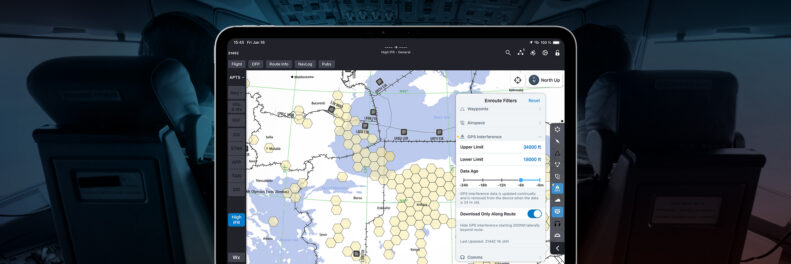
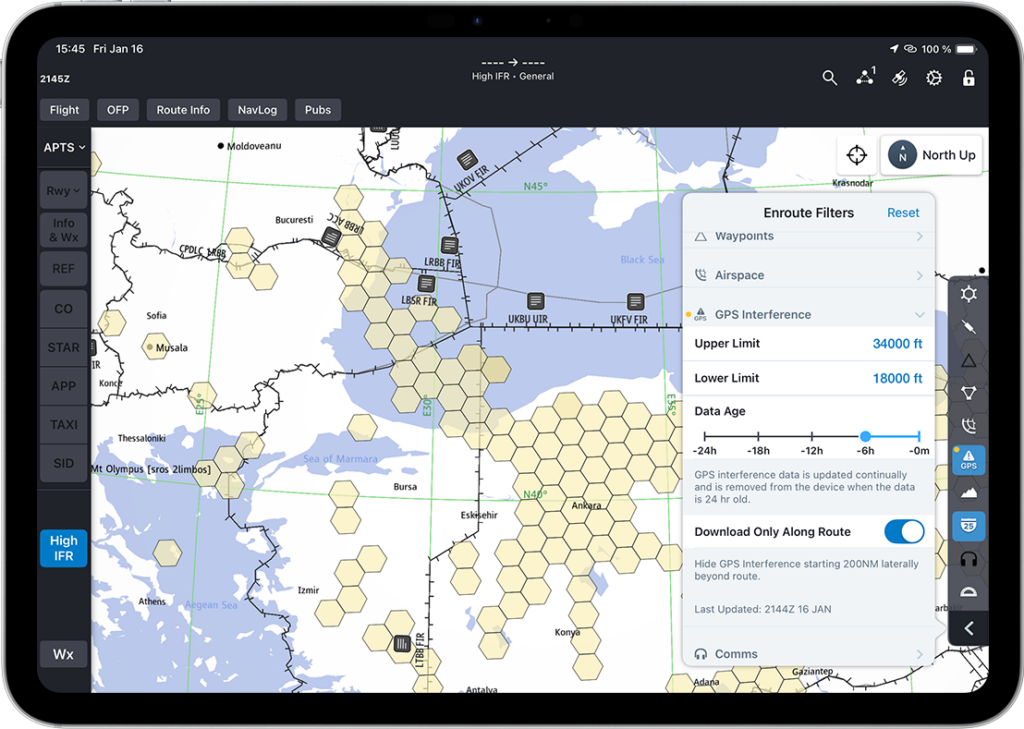
Enroute Intelligence in FliteDeck Pro addresses this by integrating FlightRadar24 GNSS interference data directly onto the enroute map in FliteDeck Pro. Before departure, crews can review GNSS jamming and spoofing areas along their planned route. During flight, pilots can filter the display to show or hide interference areas and tap any area for specific details.
GNSS interference can be toggled on and off as well as filtered by altitude, time, and data age in FliteDeck Pro.
The more significant differentiator is AID-based detection. When FliteDeck Pro is connected to a supported Aircraft Interface Device (AID), the application receives real-time notifications when GNSS spatial or temporal anomalies are detected, prompting the crew to verify position against IRS data and alert ATC before a navigation deviation occurs. AID-based GNSS anomaly detection is rare in the industry and is a meaningful capability for operators flying high-risk airspace.
Graphical NOTAMs: Seeing What Matters, When It Matters
NOTAM overload is a well-documented challenge in flight operations. As NOTAM volumes have grown, the burden of parsing dense, text-based strings to identify operationally relevant items has increased, particularly during pre-flight and high-workload phases.
According to the ICAO, “it is not uncommon for a pre-flight briefing package supporting a long-haul international flight to contain more than 100 pages of NOTAM information. Findings have shown that twenty percent of these will be old NOTAM, exceeding their three-month applicability period.”
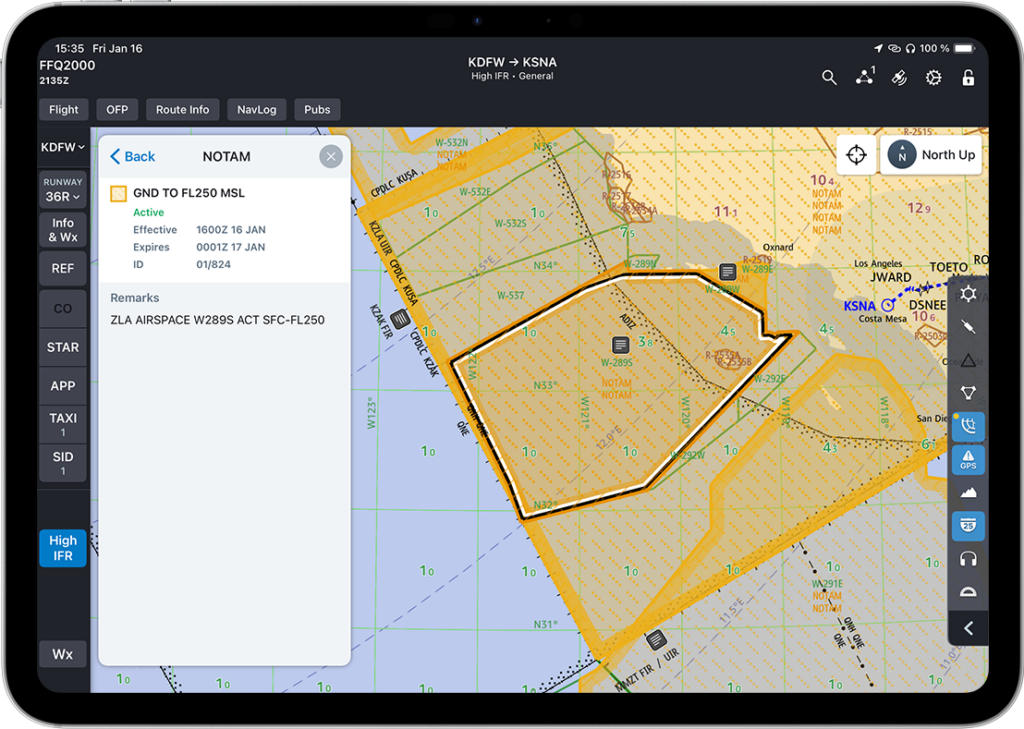
Enroute Intelligence converts state NOTAMs from text strings into simple shapes overlaid onto the enroute map in FliteDeck Pro. Crews can filter NOTAM types, build a Selected NOTAMs list focused on items relevant to the flight, and access that list quickly during flight — without digging through a text briefing document.
An active warning area off the coast of California is depicted via Graphical NOTAM in FliteDeck Pro with Enroute Intelligence
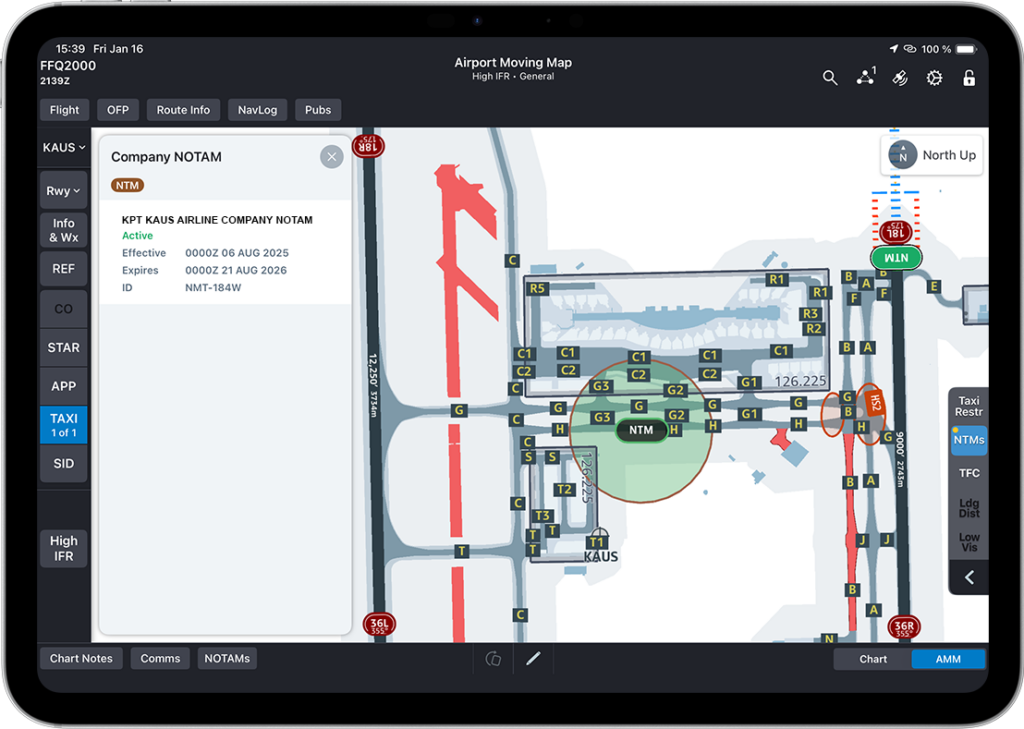
The company NOTAM path is equally important. Airlines subscribed to the NOTAM Cloud Service (NCS) who author company NOTAMs in Jeppesen’s NOTAM Management Tool can deliver those NOTAMs graphically to the flight deck. Company NOTAMs are visually distinguished from state NOTAMs on the map, ensuring airline-authored guidance is immediately identifiable without requiring the crew to cross-reference a separate list.
An example of a company NOTAM in Jeppesen FliteDeck Pro on the Airport Moving Map with Enroute Intelligence
The practical outcome: crews see closures, restrictions, and airline-specific guidance in the spatial context of their route, at the moment they need it, without adding a separate workstream to the briefing process.
ADS-B Connectivity: Traffic and Weather in One View
For operators using supported ADS-B devices — like Sentry or Sentry Mini — Enroute Intelligence provides live enroute traffic and FIS-B weather awareness directly within FliteDeck Pro, without requiring an aircraft retrofit.
Traffic is displayed via TIS-B and ADS-B Out, covering aircraft within a 15-nautical mile radius, up to 3,500 feet above or below the receiving aircraft in ATC radar contact. Pilots can see altitude, ground track, speed, distance, and tail number for each aircraft, and filter traffic to display only aircraft near the active route.
FIS-B weather is available for operations within CONUS, including regional and national RADAR, turbulence, METAR, and TAF reports. No internet connectivity is required for the ADS-B device path.
Enroute Intelligence also extends to ground operations: the ADS-B traffic display integrates with Jeppesen Airport Moving Maps (AMM), adding awareness of approaching ground traffic during taxi and supporting crew situational awareness from gate to gate.
Enroute Profile View: Making Better Altitude Decisions in the Vertical Dimension
GNSS interference, NOTAMs, and traffic are all forms of situational awareness measured across the horizontal plane of the enroute map. But some of the most consequential decisions crews make in flight (when to request a step climb, how to route around a line of thunderstorms, whether forecast icing at cruise altitude warrants a change) happen in the vertical dimension, and pilots have historically had to reconstruct that picture manually, layer by layer.
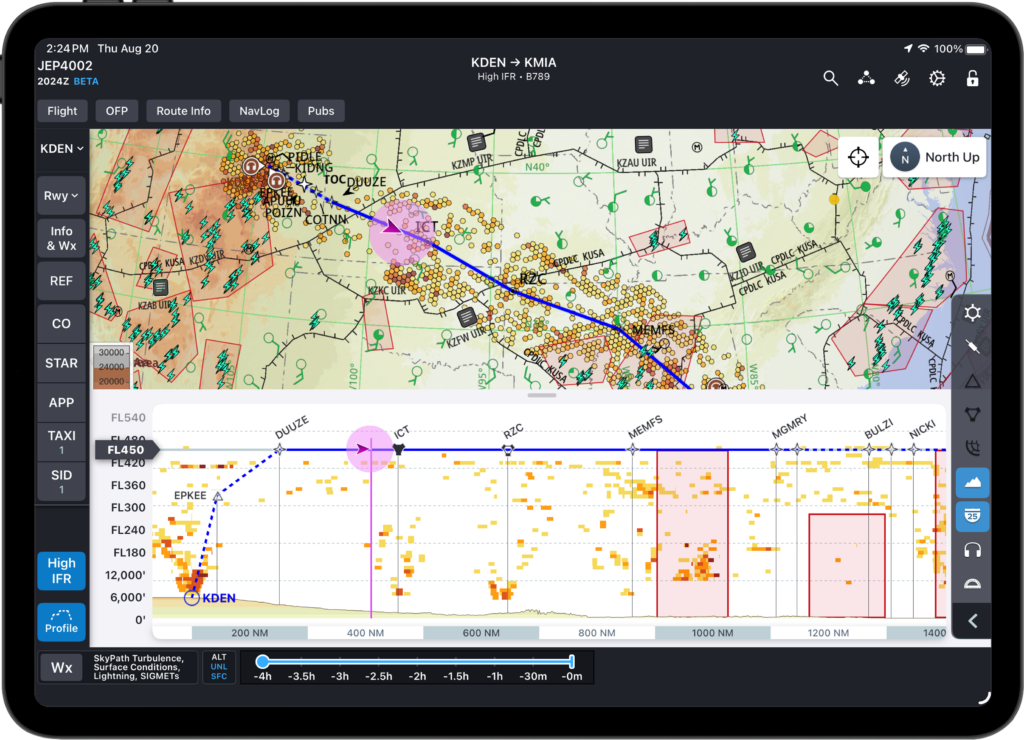
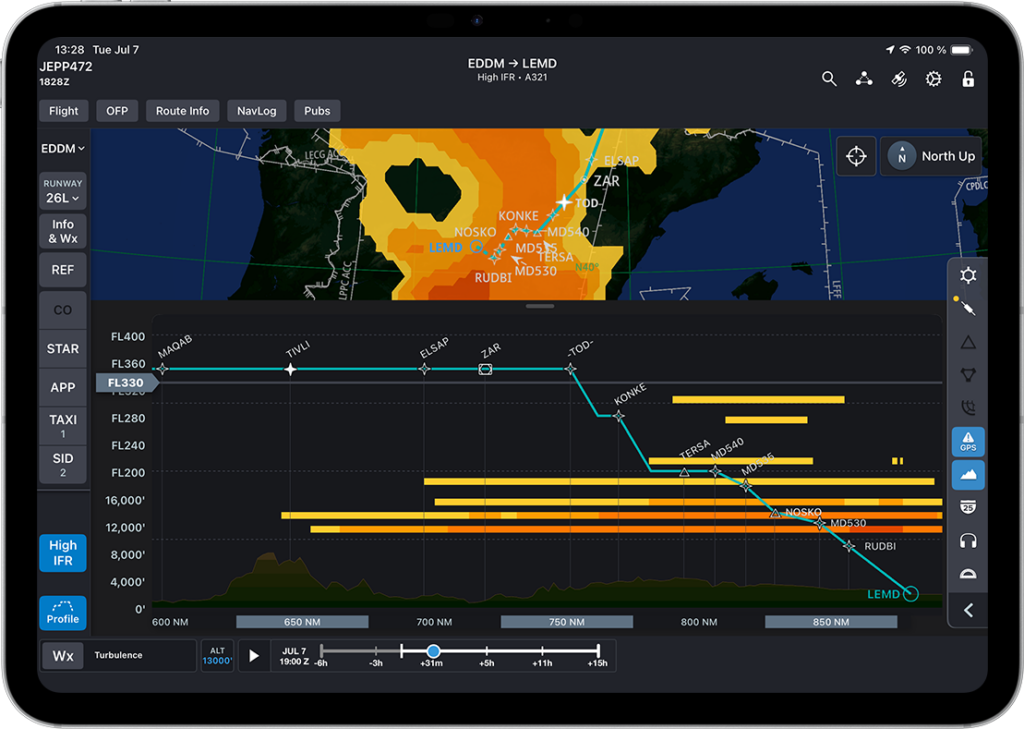
Enroute Profile View in FliteDeckPro 5.3 gives pilots a cross-section view of weather, route, and terrain with their ownship displayed at altitude on the Profile View.
With FliteDeck Pro 5.3, Enroute Intelligence adds the Enroute Profile View: a cross-section of terrain and weather along the active route, viewed in the same map crews already rely on for everything else.
A single tap on the Profile button, available from the Enroute map, opens the Profile drawer. From there, crews can pan and zoom the cross-section, and use a cruise altitude slider — defaulting to the flight-planned cruise altitude when available — to rescale the vertical view around the altitude that matters most to their flight.
The Enroute Profile View displays route, weather, and terrain in cross-section along the active route in FliteDeck Pro.
The result: pilots and dispatchers get a shared, at-a-glance vertical read on what’s ahead, reducing the mental math otherwise required to reconcile weather, terrain, and altitude across separate displays.
Who is Jeppesen Enroute Intelligence For?
Enroute Intelligence is available to any FliteDeck Pro customer. Priority use cases include:
International carriers on high-risk routes. Operators flying through active GNSS interference regions — the Black Sea, Middle East, Ukraine, Norway/Russia border, North/South Korea border, and Myanmar — have the most immediate operational need for the GPS interference layer and AID-based anomaly detection.
Operators evaluating ADS-B In compliance. Potential U.S. legislation (the Rotor Act) may require ADS-B In equipment on all aircraft by approximately 2030. The Sentry or Sentry Mini device path provides a cost-effective route to ADS-B In compliance without an airframe modification.
Airlines using the NOTAM Management Tool. Operators already subscribed to the NCS and authoring company NOTAMs in Jeppesen’s NMT can extend that content graphically to the flight deck with no additional authoring workflow.
The Bigger Picture: Designing Intelligent Flight Deck Operations
Enroute Intelligence is one layer of a broader capability set designed to deliver the right data, at the right time, in the right format, directly to your crew.
GNSS interference awareness, graphical NOTAMs, and live traffic and weather are not standalone features. Together, they form a more complete operational picture on the enroute map — one that supports faster, more confident decision-making without adding workload or requiring crews to leave the application they’re already in.
FAQ
What is Jeppesen Enroute Intelligence?
Jeppesen Enroute Intelligence is an add-on capability for Jeppesen FliteDeck Pro that adds GNSS interference visualization, graphical NOTAM display, and ADS-B traffic and weather awareness to the enroute map.
What GNSS interference data does Enroute Intelligence use?
Enroute Intelligence integrates FlightRadar24 data to display GPS jamming and spoofing areas on the enroute map. When connected to a supported Aircraft Interface Device (AID), FliteDeck Pro also delivers real-time notifications when GPS spatial or temporal anomalies are detected.
Does Enroute Intelligence require an aircraft retrofit for ADS-B?
No. The ADS-B connectivity function uses an external Sentry or Sentry Mini device, providing a cost-effective path to ADS-B In capability without requiring airframe modification.
What is required to display company NOTAMs graphically in FliteDeck Pro?
Company NOTAM graphical display requires a subscription to the NOTAM Cloud Service (NCS) and use of the NOTAM Management Tool (NMT) portal.
What version of FliteDeck Pro is required to use the Enroute Intelligence capabilities in this blog?
Most Enroute Intelligence capabilities in this blog are available in FliteDeck Pro 5.2 or later (iOS). Enroute Profile View requires FliteDeck Pro 5.3 or later.
What is the Enroute Profile View?
A cross-section display of terrain and weather along the active route, helping crews make altitude and routing decisions by showing what’s ahead vertically.